Sylphyx Voice

Hold two keys.
Speak. It's written.

Dictation for every app on Windows. Hold Ctrl + Win, say it, let go: the words appear where your cursor is, with punctuation. On your computer for free, or in the cloud with voice tokens.

For Windows 10 and 11. Free on your computer, in 25 to 99 languages. One file, nothing to install.

Try it here.

Hold the key and talk, then let go. The strip is the one Voice shows over your apps; the window is any app with a cursor. The model's raw words are on the right, and what Voice makes of them.

New message
Toanna@studio.example
SubjectRelease notes
Hold the key below and speak. The words land here.

The model heard

Hi Anna, um, the silfix build is ready. New paragraph. Could you check the release notes before Friday?

Voice writes

Hi Anna, the Sylphyx build is ready. Could you check the release notes before Friday?

  • filler word, left out
  • spoken command, a line break
  • your dictionary: silfix → Sylphyx

The demo writes example sentences (Parakeet v3, 6.4 s). Your microphone, if you allow it, only moves the bars: nothing is recorded or sent. The app writes what you say.

Where the words are made.

Local transcription

Your audio. Your computer.

On device
Your microphoneRecorded on this machineYour computerModel runs on your hardware

Download a model once. Speech recognition then runs on your hardware, with no account and no internet, and the recording never leaves the device.

The quickest by far, with punctuation and capitals of its own. English, Russian and 23 more European languages, detected automatically. The one to start with.

SpeedAccuracy

Large v3 with a lighter decoder, cut to 4 bits: every language Whisper knows, at a fraction of the size.

SpeedAccuracy

Large v3 distilled to two decoder layers: close to its accuracy in English, several times faster.

SpeedAccuracy

The full model, for the hardest audio and the rarest of 99 languages. Slow on a laptop.

SpeedAccuracy

Tiny and quick on any computer, with more mistakes. For older machines, or to try Voice in a minute.

SpeedAccuracy

Sizes are what is saved on disk; a loaded model takes about as much memory, and Voice lets it go after ten idle minutes. Speed depends on your processor and the recording.
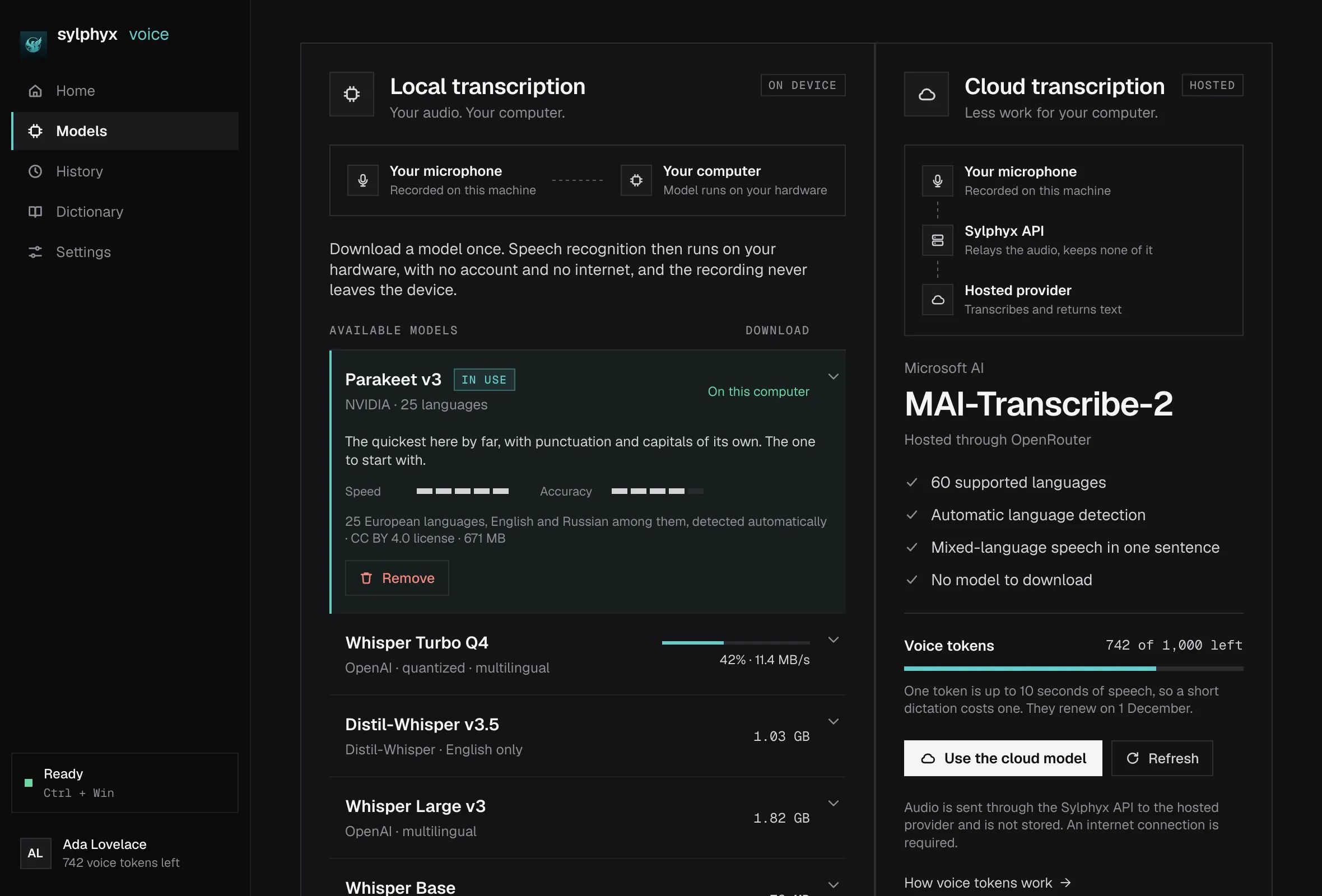

Cloud transcription

Less work for your computer.

Hosted
Your microphoneRecorded on this machineSylphyx APIRelays the audio, keeps none of itHosted providerTranscribes and returns text

Microsoft AI

MAI-Transcribe-2

Hosted through OpenRouter

  • 60 supported languages
  • Automatic language detection
  • Mixed-language speech in one sentence
  • No model to download

Audio is sent through the Sylphyx API to the hosted provider and is not stored. An internet connection is required, and each recording uses voice tokens.

How voice tokens work
The Models page of Sylphyx Voice: local models on the left, the cloud model with voice tokens on the right.
The same choice in the app, with a download under way.

Voice tokens, not a meter running.

The cloud model is counted in voice tokens: one token is up to ten seconds of speech, rounded up per dictation, so a short one costs one. Every plan has some, and they renew on the 1st. Local models never use any.

PlanVoice tokensSpeech
Without a subscription30 a monthup to 5 min
Trial, 7 days120 in allup to 20 min
Pro, $20 a month or $200 a year1,000 a monthup to 2 h 45 min

How much would you use?

528 tokens a month

2 tokens a dictation, 22 working days: it fits in the subscription's 1,000 a month.

Better than typing it.

  • Hold, or tap and talk

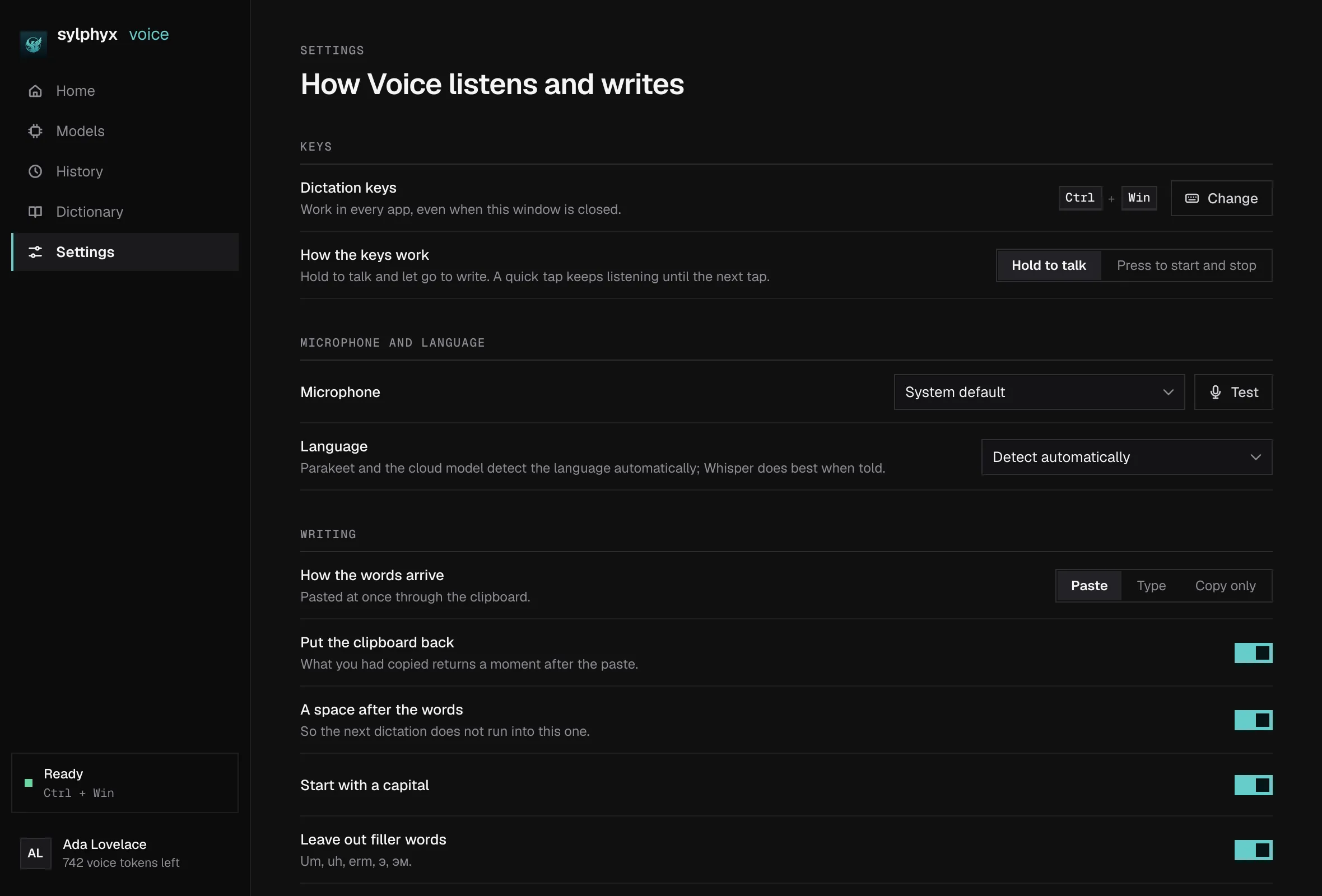
    Hold the keys to talk and let go to write. A quick tap keeps listening hands-free until the next tap. Esc cancels.

  • Into any app

    Pasted where the cursor is, or typed key by key where pasting is not allowed. What you had copied comes back after.

  • Your dictionary

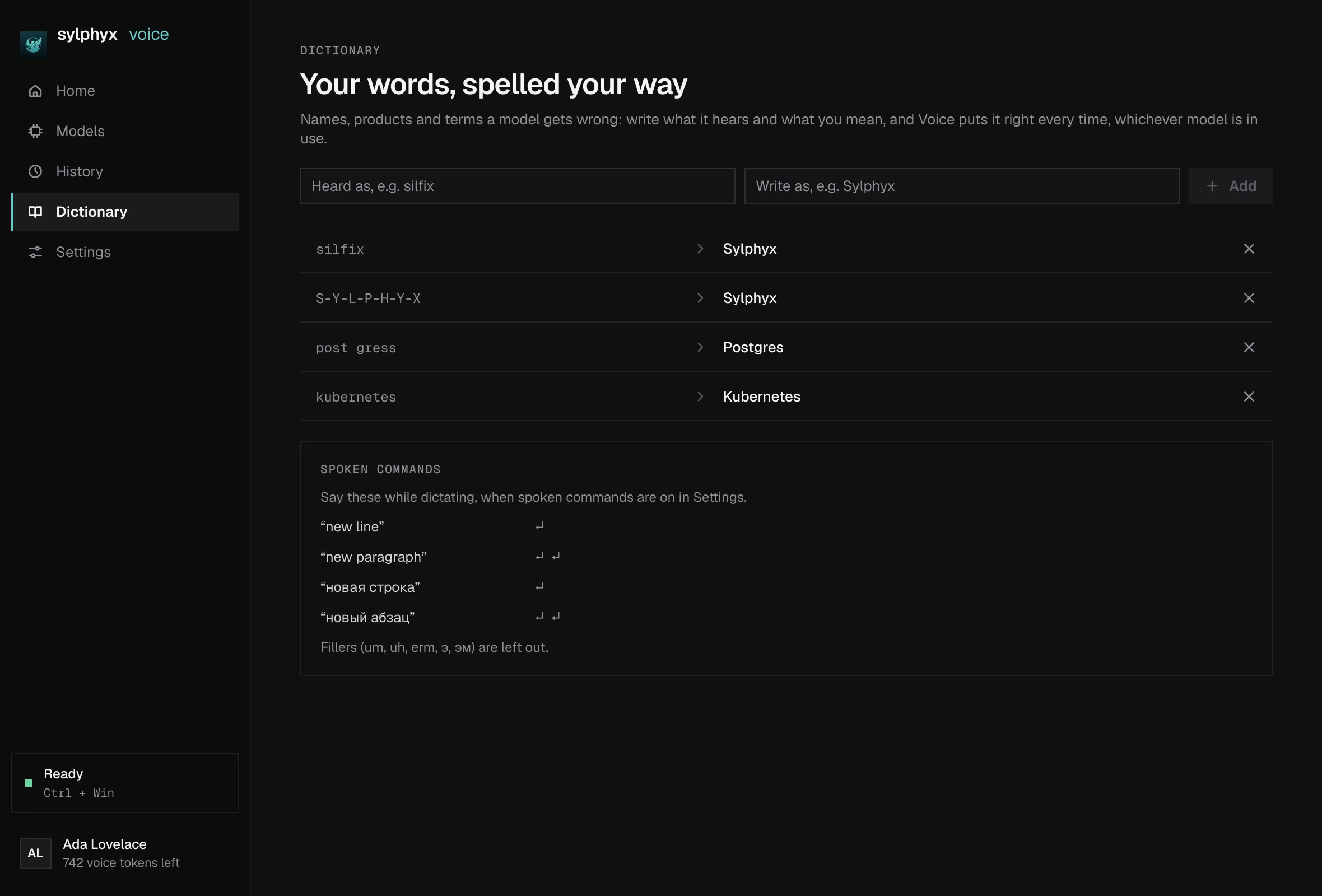
    Names and terms a model gets wrong are put right every time: write what it hears and what you mean.

  • Spoken commands

    “New line” and “new paragraph”, said on their own, in English, Russian, French, German and Spanish.

  • No filler words

    Uh, erm, э and эм are left out, commas and all, and so are um and er in English.

  • Keys of your own

    Ctrl + Win to start with. Change it in the settings: Ctrl, Alt or Win with another key, or one key you never type with, like F9.

  • History and totals

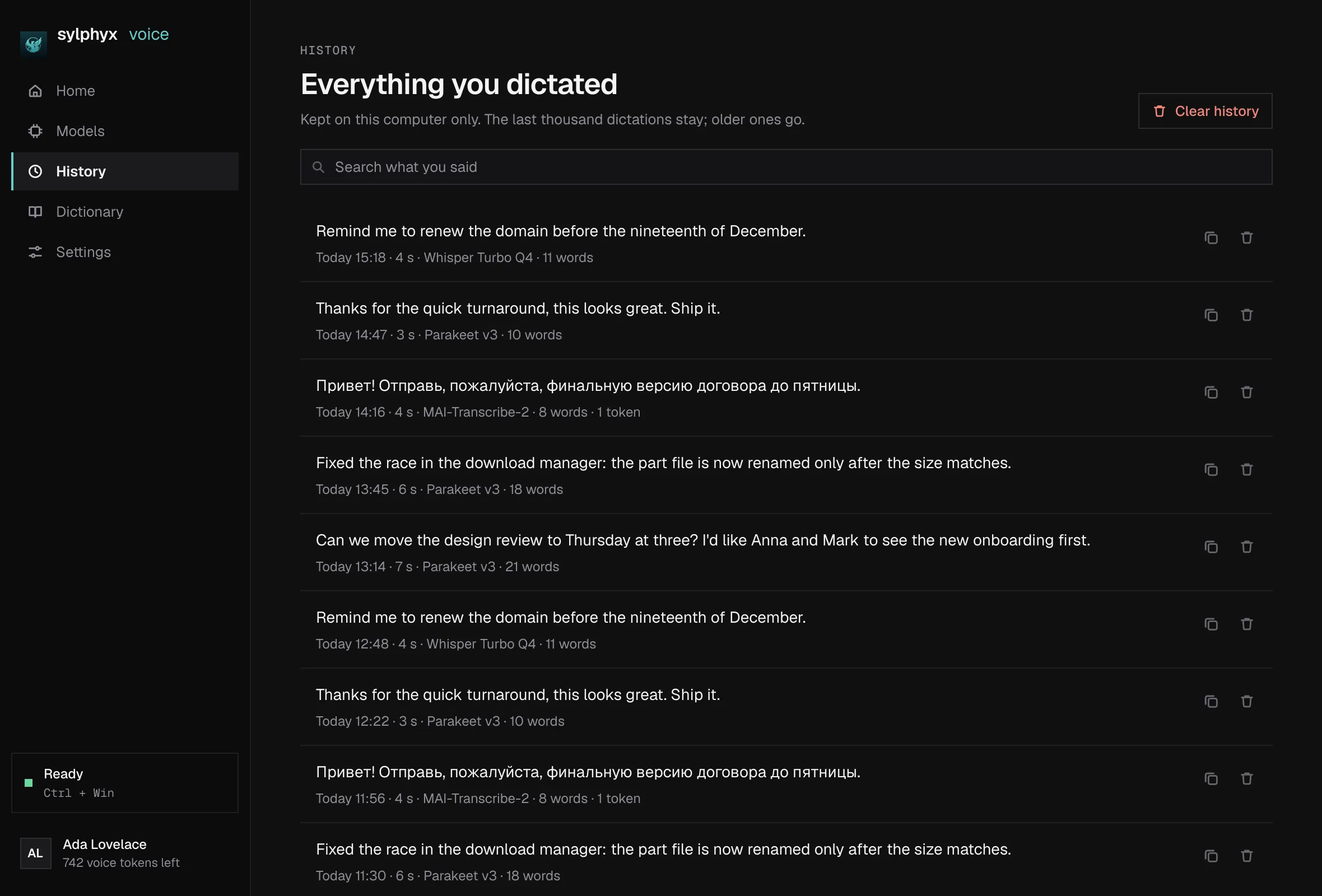
    Everything dictated, searchable, kept on your computer. Words today, time saved, how fast you speak.

  • Out of the way

    A strip at the bottom of the screen while it listens, the tray the rest of the time, and starting with Windows if you like.

The strip: Listening
Listening
The strip: Hands-free
Hands-free
The strip: Writing it down
Writing it down
The strip: Pasted
Pasted

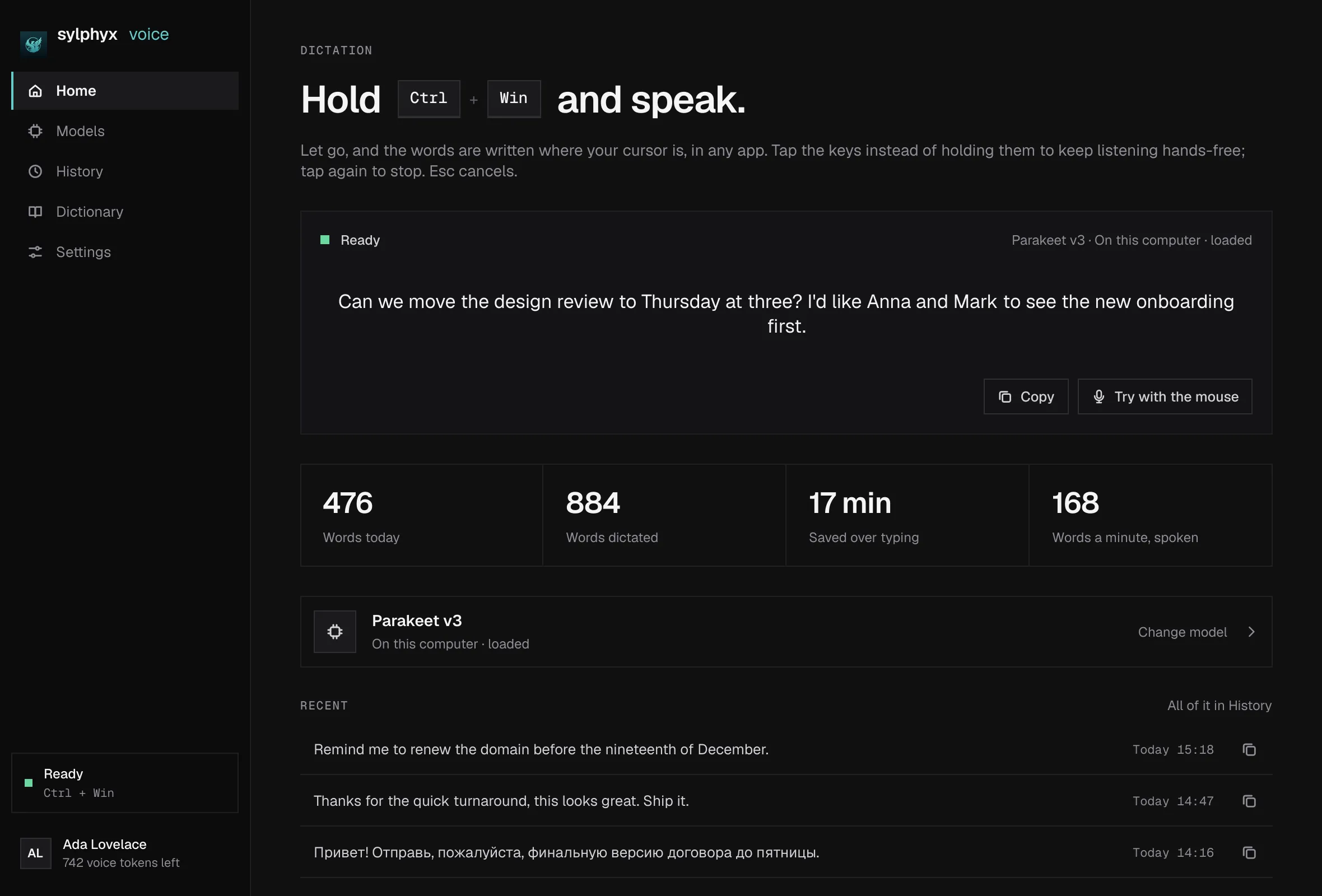
The app.

Home: the keys, a stage to try them on, and what you have saved.History: everything dictated, searchable, on your computer only.Dictionary: your spellings, and the spoken commands.Settings: keys, microphone, language and how the words arrive.
Home: the keys, a stage to try them on, and what you have saved.

Where your voice goes.

WhatWhere it goesIn detail
A recording, with a local modelNowhere

The recording is turned into text on your computer and dropped. No account, no internet.

A recording, with the cloud modelSylphyx, then OpenRouter

The recording goes through our service to Microsoft's model on OpenRouter and the text comes back. We keep neither, only how many tokens it used.

Your history and dictionaryYour computer

In a folder of your own (%LOCALAPPDATA%\Sylphyx\voice). Clear it from the app at any time.

Four steps, two minutes.

Looking for the latest release…

Windows 10 and 11, 64-bit. One file, no administrator rights. macOS and Linux are next.

  1. Download and run it. sylphyx-voice-windows-x64.exe is the whole app; keep it anywhere. Windows may say it does not know the publisher yet: More info, then Run anyway.

  2. Get a model. On the Models page, download Parakeet v3 (671 MB) once. Or sign in and use the cloud model with no download.

  3. Hold Ctrl + Win and speak. In any app, where the cursor is. Let go, and the words are there.

  4. Make it yours. Other keys, your microphone, a dictionary of names; it waits in the tray, and starts with Windows if you like.

Asked so far.

On your computer, yes: download a model and dictate as much as you like, with no account. The cloud model needs a Sylphyx account and uses voice tokens; every account has 30 a month, the trial 120, and the subscription 1,000.

Parakeet v3 hears 25 European languages, English and Russian among them, and detects the language automatically. The Whisper models know 99; the cloud model 60, and can switch between them in one sentence.

Wherever you can type. It pastes through the clipboard and puts back what you had copied; where pasting is blocked, switch it to type the words key by key. Windows does not let an ordinary app type into one running as administrator.

The cloud model says so and nothing is charged; switch to a local model, which never uses tokens, or wait for the 1st, when they renew.

No. Voice is an app of its own. It shares the account with the desktop app and the CLI, so if you are signed in to one, Voice is too.

Windows first, because holding keys in every app and typing into it is done differently on each system. macOS is next.

Say it once. It's written.